Semantic Integration EngineとVSCode連携
Semantic Integration Engineは、SimpleModeling の Body of Knowledge を RDF・ベクトル DB・知識グラフとして統合し、AI やツールから「意味を保ったまま」利用できることを目的とした意味統合エンジンです。
これまでの記事では、SIE を REST API や ChatGPT(MCP / WebSocket)から利用する方法を紹介してきました。本記事ではその流れを受け、ローカル開発環境の中核である VSCode から SIE を利用することをテーマに、MCP(Model Context Protocol)を用いた連携構成とデモを解説します。
VSCode 連携は、コード編集・設計・調査といった日常的な開発作業の中に、知識グラフ (knowledge graph)やドメイン知識を自然に組み込むための重要なステップになります。
ここまでの流れ
Semantic Integration Engineを使用するためのクライアントとして以下の方式について説明してきました。
RESTは一般的なアプリケーションへ機能を公開するインタフェースになります。
ChatGPT用にはChatGPTが使用するWebSocketインタフェースを提供しました。
一般的なMCPクライアントと異なり、ChatGPTではJSON-RPCから派生した独自プロトコルを使用して接続してくるので、そのための専用のインタフェースとなっています。
VSCode
RESTは一般的なアプリケーションへ機能を公開するインタフェースになります。
ChatGPT用にはChatGPTが使用するWebSocketインタフェースを提供しました。
一般的なMCPクライアントと異なり、ChatGPTではJSON-RPCから派生した独自プロトコルを使用して接続してくるので、そのための専用のインタフェースとなっています。
VSCodeのMCP仕様
VSCodeのMCP仕様は以下の仮定で行いました。
アーキテクチャ
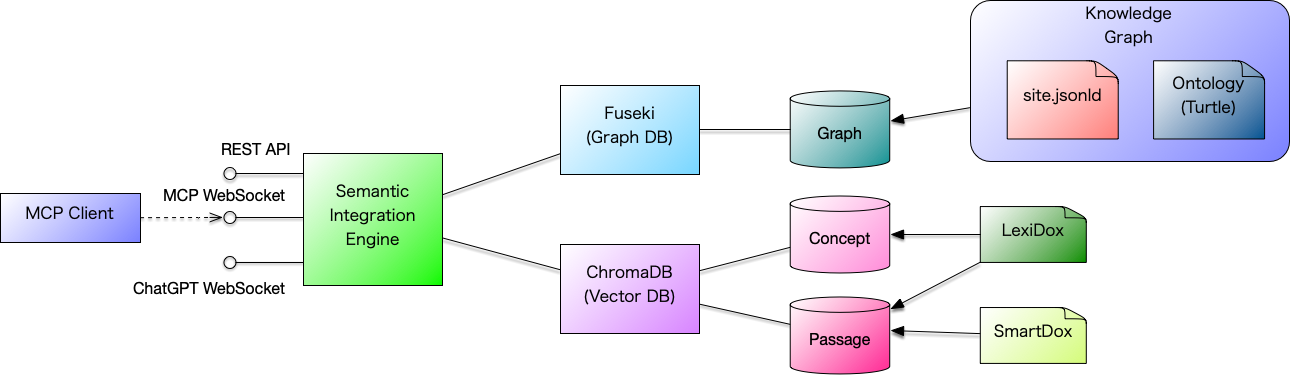
VSCodeは、ローカルで起動するコマンドに対して標準入出力を用いて RAG (Retrieval-Augmented Generation, 検索強化生成) サーバーと通信 (Communication)を行います。
SIEからは以下の3つのインタフェースが提供されています。
-
REST
-
MCP(JSON-RPC)
-
ChatGPT
JSON-RPCによるMCP通信の口に対してMcpClientコマンドが中継を行う構成になっています。
起動
デモの起動には docker compose を使用します。
以下の docker-compose.yml をコピーして作業ディレクトリを作成し、 そこに docker-compose.yml として保存します。
services:
  #######################################################################
  # FUSEKI — RDF / SPARQL server
  #######################################################################
  fuseki:
    image: ghcr.io/asami/preload-fuseki:latest
    container_name: sie-fuseki
    platform: linux/amd64
    ports:
      - "9030:3030"
    restart: unless-stopped
    networks:
      - sie-net
    healthcheck:
      test: ["CMD", "curl", "-f", "http://localhost:3030/ds/query?query=SELECT%20*%20WHERE%20%7B%20?s%20?p%20?o%20%7D%20LIMIT%201"]
      interval: 5s
      timeout: 3s
      retries: 20
      start_period: 10s
  #######################################################################
  # SIE-EMBEDDING — Lightweight embedding service
  #######################################################################
  sie-embedding:
    image: ghcr.io/asami/sie-embedding:latest
    container_name: sie-embedding
    ports:
      - "8081:8081"
    restart: unless-stopped
    networks:
      - sie-net
    healthcheck:
      test: ["CMD", "curl", "-f", "http://localhost:8081/health"]
      interval: 3s
      timeout: 2s
      retries: 20
  #######################################################################
  # SIE — Semantic Integration Engine (Demo)
  #
  # NOTE:
  # - This demo explicitly uses application.demo.conf.
  # - Do NOT rely on the image default ENTRYPOINT/CMD for demo behavior.
  # - This preserves the historical demo behavior from docker-compose.demo.yml.
  #######################################################################
  sie:
    image: ghcr.io/asami/sie:0.1.0
    container_name: sie
    volumes:
      - .:/workspace/vscode-mcp
    depends_on:
      fuseki:
        condition: service_healthy
      sie-embedding:
        condition: service_healthy
    ports:
      - "9050:9050"   # HTTP + MCP WebSocket API (/mcp)
    environment:
      SIE_MODE: demo
      # ---- Application server mode (required) ----
      SERVER_MODE: demo
      # ---- MCP / VS Code workspace ----
      SIE_WORKSPACE_DIR: /workspace/vscode-mcp
      # ---- SIE configuration ----
      FUSEKI_URL: http://sie-fuseki:3030/ds
      SIE_EMBEDDING_MODE: "oss"
      SIE_EMBEDDING_ENDPOINT: http://sie-embedding:8081/embed
    command:
      - java
      - -Dconfig.file=/app/conf/application.demo.conf
      - -jar
      - /app/semantic-integration-engine.jar
    restart: unless-stopped
    networks:
      - sie-net
  #######################################################################
  # SIE-MCP — MCP stdio client (transient, non-daemon)
  #######################################################################
  sie-mcp:
    image: ghcr.io/asami/sie:0.1.0
    container_name: sie-mcp
    entrypoint: ["/opt/sie/bin/mcp-client"]
    stdin_open: true
    tty: false
    depends_on:
      sie:
        condition: service_started
    environment:
      MCP_WS_URL: ws://sie:9050/mcp
    networks:
      - sie-net
networks:
  sie-net:
起動
作業ディレクトリに移動して、以下のように docker コマンドで起動します。
$ docker compose up -d最終的に以下の表示が終われば起動完了です。
[+] Running 5/5
 ✔ Network workd_sie-net    Created                                        0.0s
 ✔ Container sie-fuseki     Healthy                                        6.2s
 ✔ Container sie-embedding  Healthy                                       22.2s
 ✔ Container sie            Started                                       21.8s
✔ Container sie-mcp Started 21.8sなお、SIE起動完了後も HTML 文書をベクトル DB に登録する作業がバックグラウンドで走っているので、 デモの実行までは数分間をおくとよいでしょう。
運用環境
SIEを起動すると作業ディレクトリ上に以下のファイルが作成されます。
{
  "mcp.servers": {
    "sie": {
      "command": "./bin/sie-mcp"
    }
  }
}VSCode
VSCodeの設定がうまくいかないため、VSCode の Codex に以下の問い合わせをしてみました。
`console .vscode/settings.jsonの設定は正しいですか? `
回答は以下のとおりです。
`` `console ざっと見る限り、設定自体は正しいです。 確認ポイントだけ挙げると:
実行権限があるか(chmod +x 済みか) VS Code の作業ディレクトリが work.d になっているか(相対パスなので) 必要なら、こちらで存在確認と実行権限チェックのコマンドを走らせます。 ` ``
このように設定が正しいことは教えてもらえましたが、VSCodeからこの設定を使って SIE を利用することはできませんでした。 追加の設定が必要なのかもしれませんが、今回は諦めて擬似セッションで進めます。
動作確認
手動で以下のように bin/sie-mcp コマンドを起動します。 jq コマンドをパイプラインの後ろに繋ぐことで、送られてきた JSON を整形して出力することができます。
$ bin/sie-mcp | jqsie-mcp コマンドを起動すると、標準入力からの受付待ち状態 (State)になります。
initialize
初期化は initialize で行います。
{ "jsonrpc": "2.0", "id": "1", "method": "initialize"}ChatGPT の場合は以下のリクエストを送っていましたが、微妙にフォーマットが異なることが分かります。 VSCode は JSON-RPC ベースの MCP を使用しますが、ChatGPT は WebSocket を使用する点までは同じものの、 通信データは JSON-RPC 準拠ではなく独自の JSON 形式を使用しているためです。
{"type":"initialize","protocolVersion":"1.0","client":{"name":"chatgpt","version":"1.0"}}initialize による初期化で、以下の JSON が返ってきます。
{
  "jsonrpc": "2.0",
  "id": "1",
  "result": {
    "capabilities": {}
  }
}
get_manifest
get_manifest は、MCP が持っている機能の一覧を返します。
VSCode の場合は initialize のみを使用し、get_manifest は使用しないという説もありましたが、 このデモでは initialize と get_manifest を併用するルートを採用しました。
{ "jsonrpc": "2.0", "id": "1", "method": "get_manifest"}get_manifest の結果、tools に以下の 2 つのツールの情報が返ってきました。
-
query : データベースに問い合わせ
-
explainConcept : コンセプトを説明
{
  "jsonrpc": "2.0",
  "id": "1",
  "result": {
    "tools": [
      {
        "name": "query",
        "description": "Semantic query using existing query implementation",
        "input_schema": {
          "type": "object",
          "required": [
            "query"
          ]
        }
      },
      {
        "name": "explainConcept",
        "description": "Explain a concept using the SimpleModeling knowledge base",
        "input_schema": {
          "type": "object",
          "required": [
            "name"
          ]
        }
      }
    ]
  }
}
query
この中の query を実行します。
{ "jsonrpc": "2.0", "id": "1", "method": "tools/call", "params": { "name": "query", "arguments": { "query": "SimpleObject" } }}リクエストの結果、リクエストした単語に関係する以下の情報が返ってきます。
-
concepts : コンセプト一覧
-
passages : 関連する記事一覧(説明文付き)
-
graph : 知識グラフ
{
  "jsonrpc": "2.0",
  "id": "1",
  "result": {
    "concepts": [
      {
        "uri": "https://www.simplemodeling.org/glossary/domain-modeling/simpleobject",
        "label": "SimpleObject",
        "lang": "en"
      }
    ],
    "passages": [
      {
        "id": "https://www.simplemodeling.org/en/glossary/domain-modeling/simpleobject.html#chunk-0",
        "text": "SimpleObject ASAMI, Tomoharu Term SimpleObject Aliases - Definition SimpleObject is an abstract object defined in the SimpleModeling Reference Profile that specifies common attributes for domain objects. It delegates generic attribute groups—such as NameAttributes and LifecycleAttributes—as value objects, making it reusable as a base class for both entity objects and value objects. SimpleEntity inherits from SimpleObject and adds attributes such as the identifier (id) required for persistence, forming the foundation of entity objects. Category Domain Modeling SimpleModeling Reference Profile Related Terms SimpleEntity Value Object Domain Object Attribute Group Related Articles SimpleObject",
        "score": 0.7675370573997498
      },
      {
        "id": "https://www.simplemodeling.org/en/glossary/domain-modeling/simpleentity.html#chunk-0",
        "text": "SimpleEntity ASAMI, Tomoharu Term SimpleEntity Aliases - Definition SimpleObject is an abstract object defined in the SimpleModeling Reference Profile that specifies common attributes for domain objects. SimpleEntity provides a comprehensive set of attributes commonly needed by entity objects, allowing designers to define entity objects by simply adding domain-specific attributes. Category Domain Modeling SimpleModeling Reference Profile Related Terms SimpleObject Value Object Domain Object Attribute Group Related Articles SimpleObject",
        "score": 0.7702887058258057
      },
      {
        "id": "https://www.simplemodeling.org/en/domain-modeling/simple-object.html#chunk-0",
        "text": "SimpleObject ASAMI, Tomoharu Created: 2025-09-15 Updated: 2025-12-15 In the SimpleModeling Reference Profile (SMRP), the abstract class SimpleEntity is defined as the base class for all entity objects. Except for special cases, all entity objects are expected to derive from SimpleEntity. SimpleEntity provides a comprehensive set of attributes commonly needed by entity objects, allowing designers to define entity objects by simply adding domain-specific attributes. SimpleObject is defined as the base class of SimpleEntity. SimpleObject is an abstract object in SimpleModeling that defines the common attributes of domain objects. Value objects can optionally use SimpleObject as their base class. SimpleObject is composed by delegating various generic attribute groups, each of which can also be",
        "score": 0.7750577330589294
      },
      {
        "id": "https://www.simplemodeling.org/en/blog/sm-mcp-chatgpt.html#chunk-19",
        "text": "  },\n      {\n        \"id\": \"https://www.simplemodeling.org/en/domain-modeling/simple-object.html#chunk-0\",\n        \"text\": \"SimpleObject ASAMI, Tomoharu Created: 2025-09-15 In the SimpleModeling Reference Profile, the abstract class SimpleEntity is defined as the base class for all entity objects. Except for special cases, all entity objects are expected to derive from SimpleEntity. SimpleEntity provides a comprehensive set of attributes commonly needed by entity objects, allowing designers to define entity objects by simply adding domain-specific attributes. SimpleObject is defined as the base class of SimpleEntity. SimpleObject is an abstract object in SimpleModeling that defines the common attributes of domain objects. Value objects can optionally use SimpleObject as their base class. S",
        "score": 0.8564751744270325
      },
      {
        "id": "https://www.simplemodeling.org/en/domain-modeling/simple-object.html#chunk-3",
        "text": "defines an id attribute required for persistence, which makes it unsuitable for non-persistent objects like value objects. To accommodate use with value objects, a separate class named SimpleObject was defined to hold only common attributes, and SimpleEntity was made a subclass of SimpleObject. Internationalization In this article, the file simpleobject.cml is prepared in both Japanese and English versions, but in actual operation, it is also possible to include both Japanese and English descriptions side by side as shown below. Tools can extract and utilize the respective Japanese and English descriptions as needed. References Glossary SimpleEntity SimpleObject is an abstract object defined in the SimpleModeling Reference Profile that specifies common attributes for domain objects. Simple",
        "score": 0.8827045559883118
      }
    ],
    "graph": {
      "nodes": [
        {
          "id": "https://www.simplemodeling.org/glossary/domain-modeling/simpleobject",
          "label": "SimpleObject",
          "kind": "concept"
        },
        {
          "id": "https://www.simplemodeling.org/en/glossary/domain-modeling/simpleobject.html#chunk-0",
          "label": "SimpleObject ASAMI, Tomoharu Term SimpleObject Aliases - Definition SimpleObject",
          "kind": "passage"
        },
        {
          "id": "https://www.simplemodeling.org/en/glossary/domain-modeling/simpleentity.html#chunk-0",
          "label": "SimpleEntity ASAMI, Tomoharu Term SimpleEntity Aliases - Definition SimpleObject",
          "kind": "passage"
        },
        {
          "id": "https://www.simplemodeling.org/en/domain-modeling/simple-object.html#chunk-0",
          "label": "SimpleObject ASAMI, Tomoharu Created: 2025-09-15 Updated: 2025-12-15 In the Simp",
          "kind": "passage"
        },
        {
          "id": "https://www.simplemodeling.org/en/blog/sm-mcp-chatgpt.html#chunk-19",
          "label": "  },\n      {\n        \"id\": \"https://www.simplemodeling.org/en/domain-modeling/si",
          "kind": "passage"
        },
        {
          "id": "https://www.simplemodeling.org/en/domain-modeling/simple-object.html#chunk-3",
          "label": "defines an id attribute required for persistence, which makes it unsuitable for ",
          "kind": "passage"
        }
      ],
      "edges": [
        {
          "source": "https://www.simplemodeling.org/glossary/domain-modeling/simpleobject",
          "target": "https://www.simplemodeling.org/en/glossary/domain-modeling/simpleobject.html#chunk-0",
          "relation": "related"
        },
        {
          "source": "https://www.simplemodeling.org/glossary/domain-modeling/simpleobject",
          "target": "https://www.simplemodeling.org/en/glossary/domain-modeling/simpleentity.html#chunk-0",
          "relation": "related"
        },
        {
          "source": "https://www.simplemodeling.org/glossary/domain-modeling/simpleobject",
          "target": "https://www.simplemodeling.org/en/domain-modeling/simple-object.html#chunk-0",
          "relation": "related"
        },
        {
          "source": "https://www.simplemodeling.org/glossary/domain-modeling/simpleobject",
          "target": "https://www.simplemodeling.org/en/blog/sm-mcp-chatgpt.html#chunk-19",
          "relation": "related"
        },
        {
          "source": "https://www.simplemodeling.org/glossary/domain-modeling/simpleobject",
          "target": "https://www.simplemodeling.org/en/domain-modeling/simple-object.html#chunk-3",
          "relation": "related"
        }
      ]
    }
  }
}
まとめ
本記事では、Semantic Integration Engine を VSCode から MCP 経由で利用する構成について説明しました。
といった点を確認しました。
Semantic Integration Engine は、 AI と開発者が同じ知識文脈を共有するための基盤として、 今後も改善と実験を続けていきます。
参照
用語集
- RDF
-
W3C により標準化された、情報を「主語–述語–目的語」の三つ組(トリプル)で表現するための知識記述モデル。
- Semantic Integration Engine (SIE)
-
Semantic Integration Engine|Semantic Integration Engine(意味統合エンジン) ============= status=published published_at=2025-12-08 tag=simplemodeling_unique
- BoK (Body of Knowledge)
-
SimpleModelingでは文脈共有の核となる知識体系をBoK (Body of Knowledge)と呼んでいます。 BoKの構築は、知識の共有、教育、AIによる支援、自動化、意思決定支援を可能にするための基盤です。
- シンプルモデリング (SimpleModeling)
-
SimpleModelingは、KnowledgeからDomain Modelを構成し、CMLで形式化し、CozyとAIによって実行可能ソフトウェアへ実現し、Textus上で動作させる、モデリング中心のソフトウェア開発方法論と技術体系です。
- モデル・コンテキスト・プロトコル (MCP, Model Context Protocol)
-
モデル・コンテキスト・プロトコル(Model Context Protocol、MCP)とは、生成AIを利用するアプリケーションと外部のデータ源やツールを接続し、コンテキストと機能を標準化された形で提供するためのオープンプロトコルです。
- モデル (Model)
-
Modelとは、対象を特定のPurposeとConcernに基づいて選択し、理解、判断、検証、構築に利用できる形で表した抽象です。対象そのものではなく、目的に必要な要素、関係、意味を保持する表現です。
- 知識グラフ (knowledge graph)
-
現実の概念・事物・出来事をノードとし、その関係をエッジとして表す意味的グラフ構造の知識ベース。
- 通信 (Communication)
-
Undefined
- 検索強化生成 (RAG, Retrieval-Augmented Generation)
-
生成AIが内部(パラメトリック)知識だけでなく、外部の知識ソースを検索してから応答を生成する技術。 RAGはまずデータベースや知識グラフなどから関連情報を検索し、それを文脈として取り込み、より正確で最新の応答を生成する。
- 状態 (State)
-
UMLにおけるStateは、ある不変条件が成立している状況をモデル化したものです。Objectの現在のStateによって、受け付けられるEventやOperation、成立するConstraint、次に可能なTransitionが変わります。
- 操作 (Operation)
-
UMLにおけるOperationは、関連するBehaviorを呼び出すための名前、型、Parameter、Constraintを定めるClassifierのBehavioral Featureです。Operationは呼び出し契約を定め、MethodなどのBehaviorがその実現を担います。
- 仕様確認 (verification)
-
Verification(仕様確認)とは、規定された設計仕様や要求仕様に対して、実装が一致しているかを確認する行為である。