Semantic Integration Engine: A BoK Integration Demo for the AI Era
To make use of the knowledge we have built as a BoK (Body of Knowledge) with AI, we first need to encode it into a form that AI can understand, and then provide a mechanism for integrating with AI.
As the “form that AI can understand,” we automatically generate and expose a knowledge graph in RDF, as explained in 📄 KnowledgeGraph Explorer: Exploring the SimpleModeling Knowledge Graph. In that article, we introduced how to visualize this knowledge graph using the KnowledgeGraph Explorer.
What we need next is a “mechanism for integrating with AI.”
The system we are developing for this purpose is the Semantic Integration Engine (SIE).
In this article, we introduce the Semantic Integration Engine and explain how it works using a minimal demo environment in which you can actually issue queries.
BoK
In the BoK, general documents are written as SmartDox documents, while terminology is written as LexiDox documents. Because both SmartDox and LexiDox use simple plain-text formats, they can be authored not only by developers but also by domain experts.
CML documents describe the object-functional model of the software, and these are authored by developers.
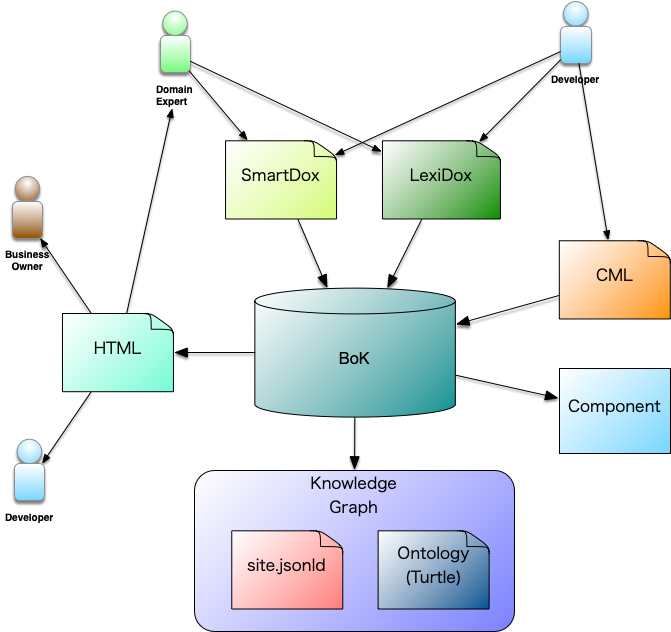
The formal knowledge defined in the BoK is published externally as HTML. Business owners, domain experts, and developers share the same formal knowledge through this common HTML.
Components usable for software development will also be generated. (planned)
The contents of the BoK are also exported as knowledge in RDF form—specifically as site.jsonld and site.ttl. Both represent RDF data, where site.jsonld uses the JSON-LD format and site.ttl uses the Turtle format.
In addition, the following ontologies—described in 📄 KnowledgeGraph Explorer: Exploring the SimpleModeling Knowledge Graph—are generated as vocabularies for the knowledge graph.
- https://www.simplemodeling.org/ontology/simplemodelingorg#
-
The core vocabulary for SimpleModeling.org as a whole. It defines the central schema for site structure, including Article, GlossaryTerm, Category, and Site. Prefix: smorg.
- https://www.simplemodeling.org/bok/ontology/0.1-SNAPSHOT#
-
The vocabulary representing the SimpleModeling Body of Knowledge. It models BoK topics, knowledge areas, and reference relationships. Prefix: smbok.
- https://www.simplemodeling.org/category/ontology/0.1-SNAPSHOT#
-
The vocabulary for category classification (domains and themes). It provides models for category hierarchies associated with articles and glossary terms. Prefix: smcat.
- https://www.simplemodeling.org/docmodel/ontology/0.1-SNAPSHOT#
-
The vocabulary describing the structure of SmartDox documents, including documents, sections, paragraphs, figures, and code blocks. Prefix: smdoc.
- https://www.simplemodeling.org/glossary/ontology/0.1-SNAPSHOT#
-
The vocabulary representing glossary concepts, defining Term, Definition, Alias, and relations such as broader/narrower. Prefix: smglo.
- https://www.simplemodeling.org/bibliography/ontology/0.1-SNAPSHOT#
-
The vocabulary modeling bibliographic information (books, papers, URLs, etc.), including authors, publication year, publisher, ISBN, and citation relationships. Prefix: smbib.
- https://www.simplemodeling.org/project/ontology/0.1-SNAPSHOT#
-
The vocabulary describing projects associated with SimpleModeling (e.g., smart tools, research lines), defining project names, deliverables, and related components. Prefix: smproj.
- https://www.simplemodeling.org/simplemodel/ontology/0.1-SNAPSHOT#
-
The vocabulary expressing SimpleModeling “modeling elements” such as Entity, Value, Event, and Rule—forming the core schema for meta-level model structure. Prefix: smodel.
- https://www.simplemodeling.org/componentRepository/ontology/0.1-SNAPSHOT#
-
The vocabulary representing the component repository—a collection of reusable components—defining components, interfaces, and dependencies. Prefix: smcompr.
Semantic Integration Engine
We developed the Semantic Integration Engine to make use of the RDF-based knowledge provided by the BoK.
The SIE integrates RDF (structure), vectors (semantic distance), and graphs (relationships) to provide a “knowledge access layer” that is easy for AI to interpret.
More concretely, it provides the following capabilities:
-
Concept Retrieval: Extracts LexiDox-based vocabulary using semantic similarity.
-
Passage Retrieval: Searches SmartDox-derived text at the chunk level.
-
Graph Retrieval: Retrieves and integrates related RDF graph structures from Fuseki.
-
ChatGPT integration via MCP/WebSocket (planned): Allows ChatGPT to query the SIE directly.
With this, AI can simultaneously reference BoK knowledge across three layers: “context,” “vocabulary,” and “structure.”
Architecture
The architecture of the Semantic Integration Engine is shown below.
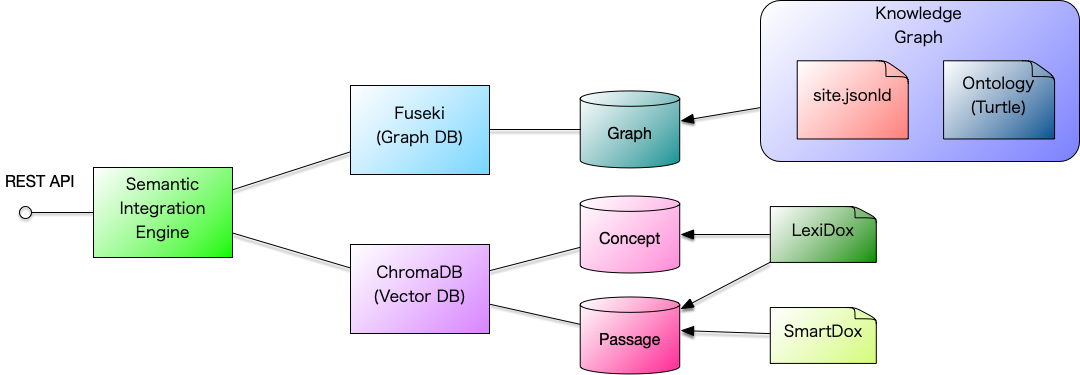
The SIE is composed of the following major components:
-
Semantic Integration Server (core)
-
Fuseki: Graph database
-
ChromaDB: Vector database
Fuseki
ChromaDB
ChromaDB is a vector database used for semantic similarity search.
In the SIE, it is used for the following purposes:
-
Concept search: Semantic distance between concepts
-
Passage search: Semantic distance between textual passages
Launch
A demo-ready docker-compose.yml is provided.
Copy the following docker-compose.yml into your working directory.
version: "3.9"
services:
  #######################################################################
  # FUSEKI — RDF / SPARQL server
  #######################################################################
  fuseki:
    image: ghcr.io/asami/preload-fuseki:latest
    container_name: sie-fuseki
    platform: linux/amd64
    ports:
      - "9030:3030"
    restart: unless-stopped
    networks:
      - sie-net
    healthcheck:
      test: ["CMD", "curl", "-f", "http://localhost:3030/ds/query?query=SELECT%20*%20WHERE%20%7B%20?s%20?p%20?o%20%7D%20LIMIT%201"]
      interval: 5s
      timeout: 3s
      retries: 20
      start_period: 10s
  #######################################################################
  # SIE-EMBEDDING — Lightweight embedding service
  #######################################################################
  sie-embedding:
    image: ghcr.io/asami/sie-embedding:latest
    container_name: sie-embedding
    ports:
      - "8081:8081"
    restart: unless-stopped
    networks:
      - sie-net
    healthcheck:
      test: ["CMD", "curl", "-f", "http://localhost:8081/health"]
      interval: 3s
      timeout: 2s
      retries: 20
  #######################################################################
  # SIE — Semantic Integration Engine (HTTP + MCP WebSocket)
  #######################################################################
  sie:
    image: ghcr.io/asami/sie:0.0.4
    command:
      - "java"
      - "-Dconfig.file=/app/conf/application.demo.conf"
      - "-jar"
      - "/app/semantic-integration-engine.jar"
    container_name: sie
    depends_on:
      fuseki:
        condition: service_healthy
      sie-embedding:
        condition: service_healthy
    ports:
      - "9050:9050"   # HTTP RAG API
      - "9051:9051"   # MCP WebSocket API
    environment:
      # ---- SIE configuration ----
      FUSEKI_URL: http://sie-fuseki:3030/ds
      SIE_EMBEDDING_MODE: "oss"
      SIE_OSS_EMBEDDING_URL: http://sie-embedding:8081/embed
      # ---- MCP WebSocket port ----
      SIE_MCP_PORT: 9051
    restart: unless-stopped
    networks:
      - sie-net
networks:
  sie-net:
Once you run Docker Compose in the directory where docker-compose.yml is placed, the SIE will start running.
$ docker compose up -d --buildSince the SIE takes a bit of time to start up, it is recommended to check its status using the health functionality as shown below.
$ curl http://localhost:9050/health | jqIf you see the following output, the basic startup process is complete.
{
  "status": "ok",
  "embedding": {
    "enabled": true,
    "reachable": true
  },
  "chroma": {
    "reachable": true,
    "collectionExists": true
  },
  "fuseki": {
    "reachable": true
  }
}
However, the data-building process from SimpleModeling.org runs in the background, and it takes several minutes to complete.
Execution
However, the data ingestion process from SimpleModeling.org runs in the background, and it takes several minutes to complete.
$ curl -X POST "http://localhost:9050/sie/query" \
  -H "Content-Type: application/json" \
  -d '{"query":"SimpleModeling"}' | jq
Execution Result
The following JSON will be displayed as the result of the query.
{
  "concepts": [
    {
      "uri": "https://www.simplemodeling.org/glossary/knowledge-development/socialization",
      "label": "共同化",
      "lang": "en"
    },
    {
      "uri": "https://www.simplemodeling.org/glossary/development-process/alpha-state",
      "label": "アルファ状態",
      "lang": "en"
    },
    {
      "uri": "https://www.simplemodeling.org/glossary/development-process/activity",
      "label": "活動",
      "lang": "en"
    }
  ],
  "passages": [
    {
      "id": "https://www.simplemodeling.org/en/blog/cbd-ai.html#chunk-1",
      "text": "ns and structural descriptions. This allows AI to understand the meaning of the model, thereby assisting in generation and validation. Furthermore, in addition to the literate model and DSL, the Body of Knowledge (BoK) developed by SimpleModeling serves as the foundation for circulating knowledge between models and AI. Literate Model–Driven AI-Assisted Development Literate model–driven AI-assisted development is a development approach in which AI supports tasks such as design, generation, and verification based on a literate model that integrates natural language with formal specifications. In this approach, the literate model functions as a shared foundation for both human understanding and machine processing, allowing AI to enhance the consistency and efficiency of development processes ",
      "score": 1.222625160273825
    },
    {
      "id": "https://www.simplemodeling.org/en/blog/cbd-ai.html#chunk-3",
      "text": "in large-scale applications, it is difficult to represent all functions solely through DSLs and models, requiring manual supplementation for parts that fall outside specifications or unique implementation elements. At this point, the key idea is to decompose functionality structurally and combine it in reusable units. In other words, the CBD approach complements the limitations of models and DSLs, serving as the key to enabling large-scale development. What Is a Component The Unified Process (UP) is based on Component-Based Development (CBD), and in UML, a component is positioned as a unit that defines contracts and interfaces. A component encapsulates functionality as a reusable and replaceable design unit. In SimpleModeling, it is redefined as a unit that can be directly handled by AI an",
      "score": 1.3652391075281525
    },
    {
      "id": "https://www.simplemodeling.org/en/blog/cbd-ai.html#chunk-4",
      "text": "d the literate model. Furthermore, a component is positioned at the intersection of the logical and physical models. On the logical model side, it serves as an abstract structural unit that defines responsibilities, contracts, and collaborations. On the physical model side, it materializes as implementation, deployment, and operational units such as modules, services, or deployable artifacts. Viewpoint Logical Model Physical Model Definition Abstract unit with responsibilities, contracts, and dependencies Concrete entities such as code, binaries, or services Purpose Structuring for functional separation and reuse Configuration management for deployment, execution, and integration Connections Collaboration and dependencies among models APIs, messaging, and deployments Thus, a component func",
      "score": 1.3914285780145474
    },
    {
      "id": "https://www.simplemodeling.org/en/blog/cbd-ai.html#chunk-0",
      "text": "Component-Based Development in the Age of AI ASAMI, Tomoharu Created: 2025-10-06 Building on the significance of DSL (Domain Specific Language)-driven development in the AI era, this article reconsiders AI-assisted Component-Based Development centered on the literate model (see 📄 AI-Driven Program Generation ― Possibilities and Challenges for details). Literate Model and CBD SimpleModeling adopts Component-Based Development (CBD) as the core of its development methodology. By leveraging the literate model, design information and specifications can be integrated into a form understandable by both humans and AI, enabling structured and consistent development with AI assistance. A literate model is a representational form that integrates natural-language explanations with formal specificatio",
      "score": 1.4848466871770634
    },
    {
      "id": "https://www.simplemodeling.org/en/blog/cbd-ai.html#chunk-17",
      "text": "ty with existing component assets. AI Across the Software Lifecycle In the AI era of Component-Based Development (CBD), AI is expected to contribute across the entire software development lifecycle. AI will function not merely as a generation tool but as a collaborative engineering partner. Because CBD is based on clearly defined structural units called components, it is particularly well-suited for AI assistance. Each component explicitly defines responsibilities, contracts, inputs/outputs, and dependencies, making them easy for AI to analyze and optimize. As a result, design, verification, and integration can be effectively automated. Furthermore, by combining SimpleModeling’s Body of Knowledge (BoK), AI can reference past design knowledge, modeling examples, and implementation patterns ",
      "score": 1.5146504776258662
    }
  ],
  "graph": {
    "nodes": [
      {
        "id": "https://www.simplemodeling.org/glossary/knowledge-development/socialization",
        "label": "共同化",
        "kind": "concept"
      },
      {
        "id": "https://www.simplemodeling.org/glossary/development-process/alpha-state",
        "label": "アルファ状態",
        "kind": "concept"
      },
      {
        "id": "https://www.simplemodeling.org/glossary/development-process/activity",
        "label": "活動",
        "kind": "concept"
      },
      {
        "id": "https://www.simplemodeling.org/en/blog/cbd-ai.html#chunk-1",
        "label": "ns and structural descriptions. This allows AI to understand the meaning of the ",
        "kind": "passage"
      },
      {
        "id": "https://www.simplemodeling.org/en/blog/cbd-ai.html#chunk-3",
        "label": "in large-scale applications, it is difficult to represent all functions solely t",
        "kind": "passage"
      },
      {
        "id": "https://www.simplemodeling.org/en/blog/cbd-ai.html#chunk-4",
        "label": "d the literate model. Furthermore, a component is positioned at the intersection",
        "kind": "passage"
      },
      {
        "id": "https://www.simplemodeling.org/en/blog/cbd-ai.html#chunk-0",
        "label": "Component-Based Development in the Age of AI ASAMI, Tomoharu Created: 2025-10-06",
        "kind": "passage"
      },
      {
        "id": "https://www.simplemodeling.org/en/blog/cbd-ai.html#chunk-17",
        "label": "ty with existing component assets. AI Across the Software Lifecycle In the AI er",
        "kind": "passage"
      }
    ],
    "edges": [
      {
        "source": "https://www.simplemodeling.org/glossary/knowledge-development/socialization",
        "target": "https://www.simplemodeling.org/en/blog/cbd-ai.html#chunk-1",
        "relation": "related"
      },
      {
        "source": "https://www.simplemodeling.org/glossary/knowledge-development/socialization",
        "target": "https://www.simplemodeling.org/en/blog/cbd-ai.html#chunk-3",
        "relation": "related"
      },
      {
        "source": "https://www.simplemodeling.org/glossary/knowledge-development/socialization",
        "target": "https://www.simplemodeling.org/en/blog/cbd-ai.html#chunk-4",
        "relation": "related"
      },
      {
        "source": "https://www.simplemodeling.org/glossary/knowledge-development/socialization",
        "target": "https://www.simplemodeling.org/en/blog/cbd-ai.html#chunk-0",
        "relation": "related"
      },
      {
        "source": "https://www.simplemodeling.org/glossary/knowledge-development/socialization",
        "target": "https://www.simplemodeling.org/en/blog/cbd-ai.html#chunk-17",
        "relation": "related"
      },
      {
        "source": "https://www.simplemodeling.org/glossary/development-process/alpha-state",
        "target": "https://www.simplemodeling.org/en/blog/cbd-ai.html#chunk-1",
        "relation": "related"
      },
      {
        "source": "https://www.simplemodeling.org/glossary/development-process/alpha-state",
        "target": "https://www.simplemodeling.org/en/blog/cbd-ai.html#chunk-3",
        "relation": "related"
      },
      {
        "source": "https://www.simplemodeling.org/glossary/development-process/alpha-state",
        "target": "https://www.simplemodeling.org/en/blog/cbd-ai.html#chunk-4",
        "relation": "related"
      },
      {
        "source": "https://www.simplemodeling.org/glossary/development-process/alpha-state",
        "target": "https://www.simplemodeling.org/en/blog/cbd-ai.html#chunk-0",
        "relation": "related"
      },
      {
        "source": "https://www.simplemodeling.org/glossary/development-process/alpha-state",
        "target": "https://www.simplemodeling.org/en/blog/cbd-ai.html#chunk-17",
        "relation": "related"
      },
      {
        "source": "https://www.simplemodeling.org/glossary/development-process/activity",
        "target": "https://www.simplemodeling.org/en/blog/cbd-ai.html#chunk-1",
        "relation": "related"
      },
      {
        "source": "https://www.simplemodeling.org/glossary/development-process/activity",
        "target": "https://www.simplemodeling.org/en/blog/cbd-ai.html#chunk-3",
        "relation": "related"
      },
      {
        "source": "https://www.simplemodeling.org/glossary/development-process/activity",
        "target": "https://www.simplemodeling.org/en/blog/cbd-ai.html#chunk-4",
        "relation": "related"
      },
      {
        "source": "https://www.simplemodeling.org/glossary/development-process/activity",
        "target": "https://www.simplemodeling.org/en/blog/cbd-ai.html#chunk-0",
        "relation": "related"
      },
      {
        "source": "https://www.simplemodeling.org/glossary/development-process/activity",
        "target": "https://www.simplemodeling.org/en/blog/cbd-ai.html#chunk-17",
        "relation": "related"
      }
    ]
  }
}
If the passages or edges fields are empty, it means the data from the SimpleModeling.org site is still being registered in the database. Please wait a few minutes and try the query again.
Explanation
The JSON returned from the query mainly contains the following three types of information:
-
concepts
-
passages
-
graph
concepts
This section lists the concepts judged to be “semantically relevant” to the query. It contains RDF concept IRIs generated from LexiDox (terminology), along with their relevance scores.
It shows “Which concepts (terms or model elements) are likely related to this query?” and serves as an anchor that prevents AI from misunderstanding what the conversation is about.
passages
This section lists the textual passages (text chunks) that are semantically close to the search query.
These results are retrieved via vector search from ChromaDB, where the text of SmartDox (documents) and LexiDox (terms) has been chunked and embedded.
Passages provide concrete explanatory text and supporting evidence used when generating answers. While concepts indicate “what the query is about,” passages provide the supporting text used for “how to explain it.”
graph
This section contains the full RDF subgraph related to the search result.
It consists of RDF triples retrieved from Fuseki, organized into a structure of “nodes” and “edges.”
Starting from the IRIs found in concepts and passages, it returns the surrounding relationships—such as categories, references, and hierarchical links (super/sub concepts).
nodes
These represent the resources (vertices) in the graph. They correspond to the nodes visualized in tools such as the KnowledgeGraph Explorer.
They provide an overview of “what kinds of resources are involved” in the result.
edges
These represent RDF triples (subject–predicate–object) as “relationship edges.”
They show “which nodes are connected to which, and through what semantic relationship.”
This becomes the foundation for AI to understand causal, hierarchical, and referential relationships.
Summary
The Semantic Integration Engine integrates the knowledge constructed in the BoK into a form usable by AI, providing an environment where semantic search is possible across three layers: concepts, documents, and graphs.
AI applications can query the knowledge graph through the REST API provided by the SIE.
Generative AI consoles such as ChatGPT can function as interactive AI clients, using the SIE as a backend to reference and reason over the knowledge.
Details on how to integrate ChatGPT with the SIE so that ChatGPT can directly utilize BoK knowledge will be explained in the next article, 📄 Integration between the Semantic Integration Engine and ChatGPT.
References
Glossary
- BoK (Body of Knowledge)
-
At SimpleModeling, the core knowledge system for contextual sharing is called the BoK (Body of Knowledge). The goal of building a BoK is to enable knowledge sharing, education, AI support, automation, and decision-making assistance.
- RDF
-
A W3C-standardized data model that represents information as subject–predicate–object triples.
- knowledge graph
-
A semantic graph-based knowledge base where nodes represent entities or concepts and edges represent their relationships.
- KnowledgeGraph Explorer
-
An application that visualizes knowledge graphs generated from SimpleModeling.org’s RDF/JSON-LD/Turtle data, allowing exploration of articles, terms, categories, and semantic relationships.
- Semantic Integration Engine (SIE)
-
Semantic Integration Engine|Semantic Integration Engine(意味統合エンジン) ============= status=published published_at=2025-12-08 tag=simplemodeling_unique
- CML (Cozy Modeling Language)
-
CML (Cozy Modeling Language) is the SimpleModeling formal modeling language for describing the Executable Model portion of an Object Model that connects to program generation and execution.
- Component
-
A software construct that encapsulates well-defined responsibilities, contracts, and dependencies as a reusable and replaceable unit. In the logical model, it serves as an abstract structural unit; in the physical model, it corresponds to an implementation or deployment unit.
- Ontology
-
An Ontology is an explicit semantic structure of the concepts, classifications, relationships, and constraints in a subject domain, used to interpret knowledge consistently.
- SimpleModeling
-
SimpleModeling is a modeling-centered software development methodology and technology system for constructing a Domain Model from Knowledge, formalizing it in CML, realizing it as executable software through Cozy and AI, and running it on Textus.
- Model
-
A Model is an abstraction that represents a subject according to a particular Purpose and Concern so that it can be understood, reasoned about, evaluated, or constructed. It is not the subject itself; it preserves the elements, relationships, and meanings required for its purpose.
- Glossary
-
A Glossary is a knowledge resource that manages the names, meanings, boundaries, synonyms, and identifiers of terms used in a subject domain. It provides a common foundation for participants to use the same terms with the same meanings.
- Event
-
In UML, an Event describes an occurrence that may arise during the execution of Behavior. Receiving an Event occurrence may trigger Behavior such as a Transition in a StateMachine.
- Model Context Protocol (MCP)
-
The Model Context Protocol (MCP) is an open protocol for connecting applications that use generative AI with external data sources and tools and for providing context and capabilities in a standardized form.
- IRI (Internationalization Resource Identifier)
-
A resource identifier used in RDF. It uniquely identifies any resource—concepts, documents, properties—on the Web.